It is very easy to Remove Windows 8 login screen. With Same procedure we can bypass Windows 8.1 login screen also. Within one minute we can do this.
By default windows 8 ask for password. Of course it is for security purpose. If you don’t need such type of security, entering password will irritate you. Every time you need to enter password to login into your system. When you use system in your home, you may not need password.
You can Remove Windows 8 login screen very easily. With the same procedure, you can enable Windows 8 log in screen when you want.
If you have already lost your windows password, you can,
If above free procedures did not work for you, you can buy reset password pro through this link http://reset-password-pro.com/?hop=whatwewa . It is a best windows password removal tool. It will come with 60 days money back guarantee, so you can easily try this.
If you just want to bypass login screen, continue reading this article.
How to Remove Windows 8 login screen
Follow below simple steps to Remove Windows 8 login screen.

- Go to start screen.
- Type “netplwiz”.
- Click on “netplwiz”. You will see “User Accounts” window as shown below.
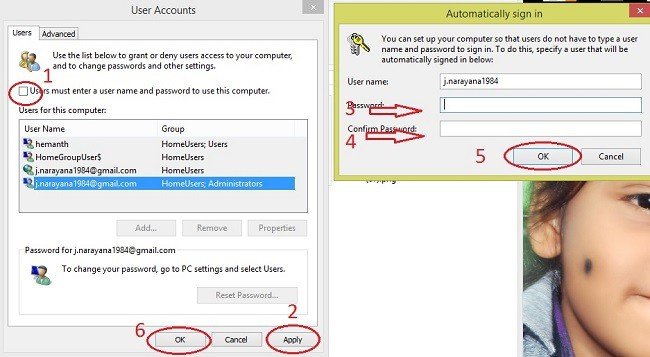
- uncheck “Users must enter a user name and password to use this computer”.
- Click “Apply”. Now you will see a small “Automatically sign in” window.
- Enter Password.
- Confirm password.
- Click Ok.
- Click Ok.
Restart your PC. Now your PC will never ask for password.
No comments:
Post a Comment